Hunk Diff Review 2026: Terminal CLI for Agent-Written Code
TL;DR
Use this article to move into a better next click
- A practical Hunk Diff review covering its terminal CLI, agent annotations, install and update paths, Git/Jujutsu/Sapling workflows, pricing, tradeoffs, and alternatives.
- Hunk is most relevant for CLI Tools + Code Review, and the directory profile adds pricing, tradeoffs, and alternatives.
- Before you commit, compare it with Delta and Difftastic.
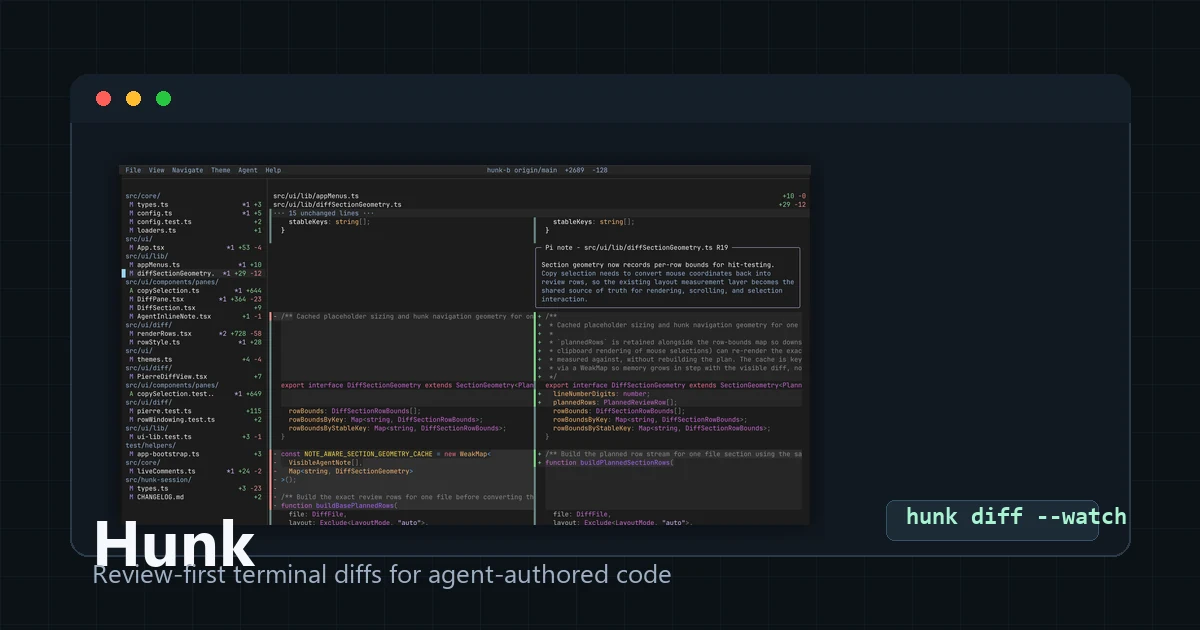
Hunk is not another coding agent. It is a terminal diff viewer built for the review problem that coding agents create: larger local changesets, faster iteration, and more context trapped in chat logs instead of the diff itself.
That distinction is the whole point. If your current bottleneck is "which agent should write the code?", Hunk is not the answer. If your bottleneck is "how do I review agent-written code before it becomes a commit or pull request?", Hunk is worth a closer look.
Quick Verdict
| Question | Hunk answer |
|---|---|
| Best for | Developers reviewing large local diffs from Claude Code, Codex, OpenCode, Aider, or similar agents |
| Not ideal for | Teams that only want browser PR review, hosted policy controls, or a full coding agent |
| Official site | hunk.dev |
| GitHub | modem-dev/hunk |
| npm package | hunkdiff |
| License | MIT on the public GitHub repository and npm package |
| Current version checked | v0.20.1, released August 29, 2026 |
| Public signal checked | About 8.9k GitHub stars, 281 forks, and same-day repository activity on September 1, 2026 |
| Pricing | Free open source; coding-agent and model costs are separate |
| Closest alternatives | Delta, Difftastic, diff-so-fancy, Open Code Review, CodeRabbit |
What Is Hunk?
Hunk is a review-first terminal diff viewer. You open it on a working-tree diff, commit, raw file comparison, or patch, then review the full changeset in an interactive terminal UI instead of paging through plain diff text.
The official README focuses on a few practical review features:
- a multi-file review stream with sidebar navigation;
- inline AI and agent annotations beside the relevant code;
- split, stacked, and responsive layouts;
- watch mode for reloading as files change;
- keyboard, mouse, pager, and Git difftool support;
- Git, Jujutsu, and Sapling workflows;
- patch review from stdin;
- an agent workflow where a coding agent can work against a live Hunk session.
That makes Hunk a local review layer, not a replacement for a hosted pull-request system. It sits between "the agent changed a lot of files" and "this is ready to commit, push, or send to review."
Keep the tool in view
Open Hunk before you forget it
The profile page adds pricing, pros, cons, and internal alternatives without throwing you straight to a vendor pitch.
Why Hunk Exists
Agentic coding changes the shape of code review. A human may not have written every changed line. The agent may have explained its reasoning in chat, but that explanation is easy to lose when you later inspect the diff. A normal terminal pager can show the patch, but it does not give you much structure for jumping across files, keeping notes near code, or staying open while the agent continues editing.
Hunk's strongest idea is simple: review should happen where the diff lives.
That is why inline agent annotations matter. They are not a substitute for your judgment. They are a way to keep the agent's claimed reasoning close to the exact code being discussed, so you can accept, challenge, or ignore it without hunting through a separate transcript.
Installation and Workflow
The official site lists a standalone installer, Homebrew, npm, mise, and Nix. The npm package is hunkdiff, while the command is hunk:
curl -fsSL https://hunk.dev/install.sh | sh
brew install hunk
npm i -g hunkdiff
mise use -g hunk
nix run github:modem-dev/hunk
hunk diff
The standalone installer verifies release checksums when a supported checksum tool is available. The installer, Homebrew, mise, and Nix ship a standalone binary; npm uses the package's declared Node.js runtime. Hunk runs on macOS, Linux, and Windows, although the exact install choices differ by platform.
Starting with Hunk 0.20, supported installs share a built-in updater:
hunk update --check
hunk update
Nix, mise, source, and custom install-directory users should keep updating through the tool that owns their installation. Check the official installation guide before standardizing a team setup.
For normal Git review, the common commands are:
hunk diff
hunk diff --watch
hunk show
hunk show HEAD~1
hunk diff --watch is the interesting one for coding-agent workflows. You can keep the review UI open while an agent edits in another terminal, then inspect the evolving changes without restarting your review surface every time.
Hunk can also be configured as a Git pager or used with Git aliases if you want it to replace raw git diff and git show output. For Jujutsu and Sapling users, the README says Hunk auto-detects those checkouts and can use native revsets through hunk diff and hunk show.
Agent Review Workflow
Hunk's agent story is narrower than a full autonomous review product, and that is a good thing. The README describes a workflow where you:
- open Hunk in one terminal with
hunk difforhunk show; - ask your coding agent to load the Hunk skill path;
- have the agent use the live Hunk session during review.
The practical value is shared context. The human sees the same review surface that the agent can inspect and annotate. That is cleaner than asking an agent to summarize a giant git diff in chat, then manually correlating those claims with the actual files.
The risk is also obvious: an agent annotation can be wrong. Hunk makes the annotation easier to inspect; it does not make it true.
What Changed in Hunk 0.20
Hunk moved materially beyond the v0.16 release covered by the original version of this review. The 0.17 through 0.20 series added a clearer in-app path for the review skill, more precise live-agent guidance, stronger large-review responsiveness, checksum-verified installation, self-updates, and an experimental TypeScript extension system.
Extensions can add commands, themes, file previews, transforms, sidebars, and version-control backends. They can be installed from Git repositories or loaded from user and repository configuration. That makes Hunk more adaptable than a fixed diff pager, but it creates a new trust boundary: extensions run with the user's permissions, and repository-local extensions require an explicit trust decision. The API is still experimental and can change between minor releases.
Version 0.20.1 is also worth treating as an update floor rather than a cosmetic release. It rejects option-like Git ranges and refs during session reloads, preventing a broker caller from injecting Git flags and writing diff output to arbitrary paths. It also fixes stale syntax-highlight cache collisions after reloads. Users on older versions should review the v0.20.1 release notes and update through their installation method.
Pricing Reality
Hunk itself is free and MIT licensed. The public GitHub repository and the npm package both report MIT licensing, and the tool can be installed without a product subscription.
The real cost depends on what you pair it with:
- Claude Code, Codex, OpenCode, Aider, or other agents may have their own model, subscription, or API costs;
- review time still belongs to your team;
- stricter environments may need policy work before allowing local agent-session integration;
- hosted review products may still be needed for organization-level checks, approvals, and audit trails.
So the accurate pricing answer is: Hunk is free; the agent workflow around it may not be.
Where Hunk Looks Strong
It Targets a Real Agent-Coding Bottleneck
Many AI coding products focus on generating more code. Hunk focuses on inspecting the code that has already been generated. That is a healthier place to add tooling because review quality is now one of the biggest constraints in vibe-coding workflows.
The Terminal UI Is Purpose-Built for Full Changesets
Hunk is more than colored diff output. The sidebar, file navigation, layout switching, syntax highlighting, line numbers, wrapping controls, mouse support, and theme options are all aimed at reviewing a complete changeset rather than reading one patch hunk at a time.
Watch Mode Fits Agent Iteration
Coding agents often edit, test, revise, and edit again. Keeping a diff viewer open while the working tree changes is a practical workflow improvement, especially if you are supervising the agent rather than writing every line yourself.
The Open-Source Signal Is Credible
When checked on September 1, 2026, the public repository showed about 8.9k GitHub stars, 281 forks, MIT licensing, same-day activity, and a latest stable v0.20.1 release from August 29. That does not guarantee durability, but the growth and release cadence are enough signal to justify evaluating a focused developer tool.
Compare before you switch
Pressure-test Hunk
Use the alternatives block on the tool page before you leave for the official site. That one extra step usually saves you a bad pick.
Tradeoffs and Risks
Hunk is not the right tool for every team.
First, it is local and terminal-first. If your team lives entirely inside GitHub, GitLab, Linear, or an IDE review panel, Hunk may feel like another surface to maintain.
Second, it does not replace policy. You still need branch protection, CI, secret scanning, tests, and human review for important changes.
Third, inline AI notes can become noise if you let the agent annotate obvious code or over-explain weak reasoning. The feature is useful only when the notes help you review faster or catch intent mismatches.
Fourth, Hunk is optimized for review-first diffs, not semantic differencing. Difftastic remains the more natural comparison if your main need is syntax-aware structural diffing.
Fifth, extensions are powerful but experimental. An installed extension runs with your user permissions, so teams should inspect and pin extension sources instead of treating the community directory as a security review.
Finally, agent live-session workflows may be blocked by stricter sandboxes or local access rules. That is not a flaw in the diff viewer, but it matters in locked-down environments.
Hunk Alternatives
Delta: Choose Delta if you want a mature, beautiful Git pager with syntax highlighting and side-by-side diff output. Choose Hunk if you want a more interactive changeset review UI and agent annotations.
Difftastic: Choose Difftastic if structural, syntax-aware diffing is the priority. Choose Hunk if your priority is navigating and reviewing a whole agent-authored changeset.
diff-so-fancy: Choose diff-so-fancy if you want cleaner plain Git output with minimal workflow change. Hunk is heavier, but it gives you a real review interface.
Open Code Review: Compare Open Code Review if you want an open-source review workflow closer to pull-request review rather than a terminal diff viewer.
CodeRabbit: Compare CodeRabbit if you want hosted AI review on pull requests. Hunk is local and pre-commit; CodeRabbit is more about repository platform review.
Raw Git diff: Keep raw git diff if your changes are small and you do not need another interface. Hunk earns its place when diffs are large, agent-generated, or changing while you review.
Who Should Try Hunk?
Hunk is a good fit if you:
- use terminal coding agents and regularly inspect large local diffs;
- want review context beside the code instead of buried in chat;
- prefer local tools before pushing a branch;
- use Git, Jujutsu, or Sapling;
- want a free, MIT-licensed tool with npm, Homebrew, and Nix install paths;
- are willing to keep human review responsibility instead of outsourcing judgment to annotations.
It is a weaker fit if you:
- want the agent to write code, not a tool to review it;
- need enterprise hosted review controls first;
- dislike terminal UIs;
- only review small manual edits;
- expect AI annotations to replace tests, CI, or code ownership.
Practical Verdict
Hunk is worth trying if agent-written diffs have become harder to review than to produce. Its best feature is not that it adds AI to diff review. Its best feature is that it treats review as the main workflow: a navigable full changeset, live while files change, with agent context close enough to interrogate.
That is a useful niche. Hunk will not make weak code safe, and it will not replace your pull-request process. But for terminal-heavy developers supervising Claude Code, Codex, OpenCode, Aider, or similar tools, it can be the missing local review layer before the branch leaves your machine.
Start with the Hunk tool profile, the official site, the documentation, the GitHub repository, and the hunkdiff npm package.