
Warp
Warp is an agentic development environment that combines a modern terminal, built-in and cloud coding agents, and support for external CLI agents like Claude Code, Codex, and Gemini CLI.
Do not bounce yet
Read the fit check, compare one alternative, then decide whether the vendor page is still your best next click.
Quick Verdict
Fast fit check before you leave the page
Make the fit call first. Vendor pages are good at selling, but they rarely tell you where the product is a bad match.
- Terminal-first developers who want serious AI help without making an IDE their new center of gravity
- Founders and solo engineers who want one environment for commands, implementation, debugging, and agent-assisted iteration
- Teams evaluating whether an AI-native terminal can replace part of the sprawl between editor plugins, cloud agents, and separate shell tooling
- The product is broad enough to feel like a platform more than a simple coding tool, which means some developers will find it overbuilt compared with leaner CLI agents.
- Open source here does not mean fully local or fully simple: the codebase is mixed MIT plus AGPL, while many of the highest-value AI workflows still depend on paid hosted services.
- Pricing is credit-heavy and more complicated than flat-subscription tools, so heavy users need to pay attention instead of assuming the free tier scales gracefully.
Compare Next
Take one more internal step before the vendor pitch
This is where visitors usually jump out too early. Read one deeper take or open one alternative so the next click is informed instead of impulsive.
Alternative profile
Claude Code Router
MIT-licensed local gateway and desktop control plane for routing Claude Code, Codex, Grok CLI, and compatible agents across model providers.
Alternative profile
Claude Code
Anthropic’s agentic coding platform for terminal, IDE, desktop, web, CI, and code-review workflows.
Alternative profile
Claude Code Chat
Source-available VS Code and Cursor interface for Claude Code with checkpoints, inline diffs, history, permissions, and extension marketplaces.
Warp is not just trying to be a prettier terminal. Its real pitch is that the terminal should become a full agentic development environment: a place where command execution, codebase context, cloud agents, completions, and external coding agents can all coexist without forcing developers into a browser tab or heavyweight AI IDE.
Warp positions itself as an agentic development environment born out of the terminal rather than another editor sidebar. It combines a modern terminal UI with command blocks, search, completions, codebase indexing, built-in Oz agents, cloud agents, and support for bring-your-own CLI agents such as Claude Code, Codex, and Gemini CLI, making it relevant for developers who want terminal-first workflows without giving up higher-level agentic coding capabilities.
Why Choose Warp?
Warp is compelling if your natural habitat is still the terminal, because it upgrades the shell experience itself instead of asking you to abandon it for an editor-centric assistant.
The product can use Warp's own agent workflow while also supporting external CLI agents such as Claude Code, Codex, and Gemini CLI, which makes it strategically more flexible than single-vendor agent environments.
The combination of command blocks, search, completions, indexing, and cloud agents gives it a more coherent product shape than simple terminal wrappers that only add AI chat.
Its open-source move gives technical buyers a better trust story than another black-box AI dev tool, even though the overall commercial product still includes paid hosted layers.
Key Features
Modern terminal foundation with blocks, command search, autosuggestions, tab completions, and other UX upgrades that go beyond a plain shell window.
Built-in Oz and cloud-agent workflow for agentic coding tasks without forcing developers into a separate browser product.
Bring-your-own CLI agent support for tools like Claude Code, Codex, and Gemini CLI instead of trapping users inside a single proprietary agent surface.
Codebase indexing, model access, and higher-tier BYO API key support for developers who want both hosted convenience and some provider flexibility.
Warp Drive and collaboration features for saving, sharing, and reusing terminal and agent artifacts across a team.
Open-source client codebase with active upstream contribution flow, public issue tracker, and a large public GitHub footprint.
Pros & Cons
- Warp is one of the few serious products trying to make the terminal itself agent-native instead of bolting a chat box onto an editor and calling it innovation.
- Support for both Warp's own agents and external CLI agents gives it a better lock-in story than single-agent products that demand full workflow surrender.
- Public signal is strong enough to clear the hype threshold: Warp claims 700K+ developers, the repo is above 49k GitHub stars, and the open-source launch drew substantial Hacker News discussion.
- For terminal-first developers, blocks, indexing, command UX, and cloud agents create a more coherent environment than juggling a bare shell plus separate AI tabs.
- The product is broad enough to feel like a platform more than a simple coding tool, which means some developers will find it overbuilt compared with leaner CLI agents.
- Open source here does not mean fully local or fully simple: the codebase is mixed MIT plus AGPL, while many of the highest-value AI workflows still depend on paid hosted services.
- Pricing is credit-heavy and more complicated than flat-subscription tools, so heavy users need to pay attention instead of assuming the free tier scales gracefully.
- Terminal purists may still prefer smaller tools because Warp's UX abstractions, collaboration layers, and cloud features are exactly the kind of stuff they think terminals should avoid.
Detailed Use Cases for Warp
Warp makes the most sense for developers who already live in the shell and want coding agents, indexing, and model-assisted workflows without relocating everything into a conventional AI IDE.
Because Warp supports its own Oz workflow and external CLI agents, developers can choose the right agent surface per task rather than hard-committing to one vendor's way of working.
Repo chores, debugging, migrations, build work, and command-heavy coding sessions benefit from Warp's blocks, history, search, and cloud-agent support more than from editor-only assistants.
Teams comparing terminal upgrades such as Warp with AI IDEs and raw CLI agents should treat Warp as a serious category bridge, not as a cosmetic shell skin.
Who Should Use Warp?
Terminal-first developers who want serious AI help without making an IDE their new center of gravity
Founders and solo engineers who want one environment for commands, implementation, debugging, and agent-assisted iteration
Teams evaluating whether an AI-native terminal can replace part of the sprawl between editor plugins, cloud agents, and separate shell tooling
Developers comparing Warp against Claude Code, Cursor, Windsurf, and non-AI terminals like Ghostty or Windows Terminal
Perfect For
Terminal-first developers who want agentic coding help without moving their primary workflow into a full AI IDE.
Teams that want one environment covering terminal UX, cloud agents, saved workflows, and collaboration instead of stitching together multiple separate products.
Developers who want to mix Warp's own Oz workflow with external agents like Claude Code, Codex, or Gemini CLI depending on the task.
Repo maintenance, debugging, and implementation loops where command history, blocks, indexing, and terminal-native AI all matter.
Technical Details
Direct Competitors
Claude Code
OpenAI Codex
Cursor
Windsurf
Ghostty
Similar Tools You Might Like
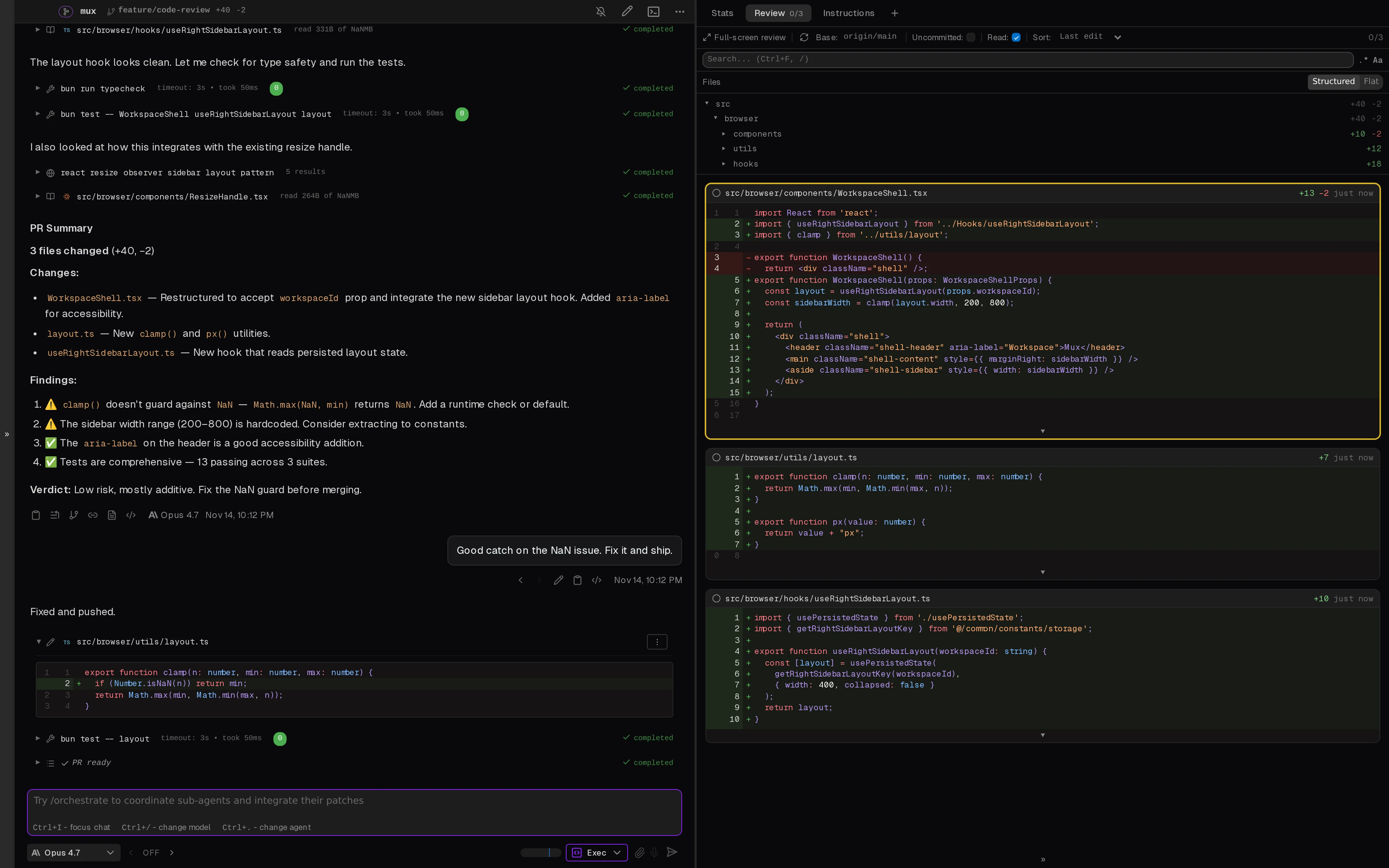
Open-source desktop and browser coding-agent multiplexer for running parallel AI agents across isolated local, worktree, and SSH workspaces.

Open-source macOS desktop UI for orchestrating Claude Code and OpenAI Codex with local CLI auth and parallel threads.

MIT-licensed agent development environment for running Claude Code, Codex, OpenCode, Cursor CLI, and custom agents in parallel Git worktrees.
Alternative Tools to Consider

MIT-licensed local gateway and desktop control plane for routing Claude Code, Codex, Grok CLI, and compatible agents across model providers.

Anthropic’s agentic coding platform for terminal, IDE, desktop, web, CI, and code-review workflows.

Source-available VS Code and Cursor interface for Claude Code with checkpoints, inline diffs, history, permissions, and extension marketplaces.

Open-source terminal dashboard for tracking Claude Code token usage, burn rate, and predicted session cutoffs.

AI code editor with local, cloud, CLI, and mobile coding agents

OpenAI's open-source agent harness for terminal coding, SDK automation, app-server integrations, IDE work, and cloud-assisted workflows.
Do one more comparison before you commit to Warp
Strong picks usually survive one more internal check. Read deeper, compare a neighbor, then leave for the vendor page if the fit still holds.