
OpenClawdex
Open-source macOS desktop UI for orchestrating Claude Code and OpenAI Codex with local CLI auth and parallel threads.
Do not bounce yet
Read the fit check, compare one alternative, then decide whether the vendor page is still your best next click.
Quick Verdict
Fast fit check before you leave the page
Make the fit call first. Vendor pages are good at selling, but they rarely tell you where the product is a bad match.
- macOS developers already using Claude Code and/or OpenAI Codex locally
- Solo builders who want a cleaner local orchestration layer than raw terminal tabs
- Developers comparing lightweight desktop agent shells against heavier multi-agent control planes
- This is still an early-stage project with very limited adoption signal, so the product and workflow assumptions may churn quickly.
- macOS-only release support is a real limitation if your team expects Windows or Linux parity today.
- It is a narrower orchestrator than tools like Orca or Claude Squad because the current scope is mainly Claude Code plus Codex.
Compare Next
Take one more internal step before the vendor pitch
This is where visitors usually jump out too early. Read one deeper take or open one alternative so the next click is informed instead of impulsive.
Alternative profile
Claude Squad
Open-source terminal app for managing multiple AI coding agents like Claude Code, Codex, OpenCode, and Aider across isolated workspaces.
Alternative profile
Cursor
AI code editor with local, cloud, CLI, and mobile coding agents
Alternative profile
OpenAI Codex
OpenAI's open-source agent harness for terminal coding, SDK automation, app-server integrations, IDE work, and cloud-assisted workflows.
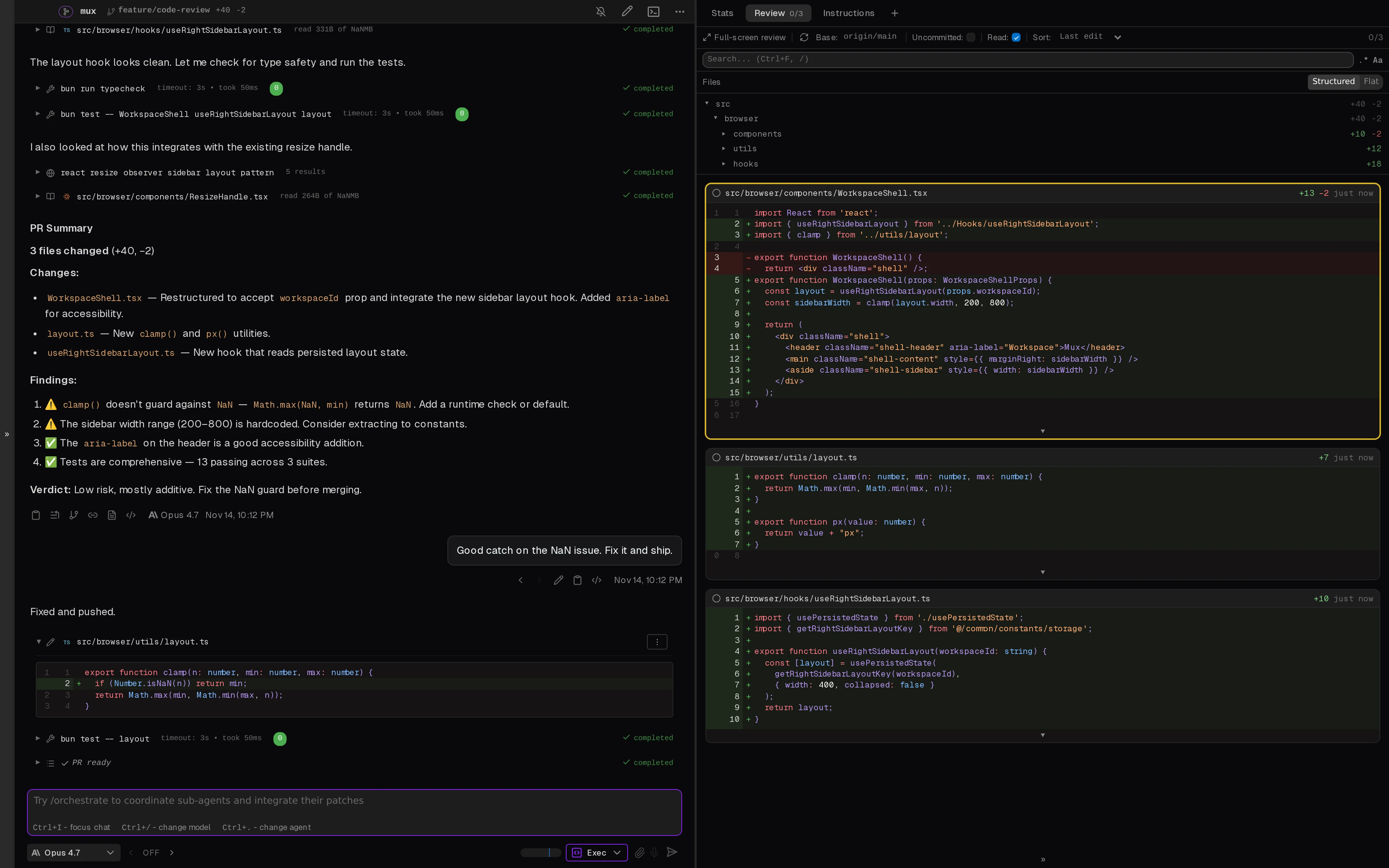
OpenClawdex is a local desktop orchestrator for developers who like Claude Code and OpenAI Codex but do not enjoy supervising them through scattered terminals. Instead of adding another hosted agent layer, it gives macOS users a lightweight native-feeling UI for running both tools side by side, managing thread history, handling approvals, and jumping straight into their editor when a file or diff matters.
OpenClawdex is a lightweight macOS desktop orchestrator for developers who want a cleaner operator surface for Claude Code and OpenAI Codex without moving into a hosted browser product. It sits on top of your existing local CLI logins, lets you run both agents side by side, preserves thread history across restarts, handles inline approval prompts, and opens files or diffs in your own editor instead of trapping review inside a custom sidebar. That makes it legitimately relevant to vibe coding as a local control layer for multi-agent execution, even if it is still much earlier and narrower than broader orchestration tools like Orca or Claude Squad.
Why Choose OpenClawdex?
Choose OpenClawdex if you want a local operator surface for Claude Code and Codex without inventing a new cloud dependency just to manage your existing CLI agents.
Its most practical advantage is workflow compression: one desktop app, shared project organization, parallel threads, and inline approvals instead of terminal sprawl.
Using existing CLI authentication is a real differentiator because it removes extra key management and keeps the product aligned with tools you already pay for.
The caveat is obvious and should not be hidden: OpenClawdex is early, macOS-only today, and not yet validated by broad market adoption.
Key Features
Runs Claude Code and OpenAI Codex side by side in one native-feeling desktop UI instead of separate terminal windows.
Uses your existing local CLI authentication, so there is no extra OAuth flow, API-key paste step, or separate billing surface.
Supports parallel threads, project grouping, pinned threads, archives, and persistent history across restarts.
Handles inline approvals for tool permissions, plans, and agent questions instead of kicking every interruption back to raw terminal prompts.
Lets you open files and diffs directly in your preferred editor rather than forcing review into a custom embedded diff pane.
Ships as an MIT-licensed open-source Electron app with downloadable macOS release assets.
Pros & Cons
- OpenClawdex solves a real local workflow problem: Claude Code and Codex are more useful when they share one operator surface instead of competing for terminal attention.
- Using existing CLI auth is strategically better than inventing another hosted account system for a tool that mainly orchestrates local agents.
- The approval cards and persistent history make it meaningfully more usable than a bare wrapper around two subprocesses.
- MIT licensing and a public repo make it easier to inspect than many launch-week desktop agent experiments.
- This is still an early-stage project with very limited adoption signal, so the product and workflow assumptions may churn quickly.
- macOS-only release support is a real limitation if your team expects Windows or Linux parity today.
- It is a narrower orchestrator than tools like Orca or Claude Squad because the current scope is mainly Claude Code plus Codex.
- Useful operation still depends on maintaining your own local CLI installs, subscriptions, and permission hygiene.
Detailed Use Cases for OpenClawdex
Use OpenClawdex when you want both agents in one desktop surface with project grouping, parallel threads, and persistent local history.
Because OpenClawdex rides on top of your existing CLI logins, it is useful when you want less credential sprawl rather than another account system.
The inline approval and question cards are helpful when coding agents keep interrupting the flow and you want a cleaner control loop than raw terminal prompts.
If the main job is orchestrating agents but the real file review still belongs in VS Code or Cursor, OpenClawdex offers a saner split than an all-in-one editor replacement.
Who Should Use OpenClawdex?
macOS developers already using Claude Code and/or OpenAI Codex locally
Solo builders who want a cleaner local orchestration layer than raw terminal tabs
Developers comparing lightweight desktop agent shells against heavier multi-agent control planes
People who prefer local-first coding workflows over browser-hosted orchestration products
Perfect For
Run Claude Code and Codex in parallel on the same machine without juggling separate terminal layouts.
Use a lightweight desktop shell for local coding agents while still opening files and diffs in VS Code, Cursor, or another editor.
Keep project threads, approvals, and history organized when a solo developer wants more structure than raw CLI sessions provide.
Evaluate a local-first alternative to heavier multi-agent orchestration products before standardizing a broader team workflow.
Technical Details
Direct Competitors
Orca
Claude Squad
Cursor
OpenAI Codex
Similar Tools You Might Like
Open-source desktop and browser coding-agent multiplexer for running parallel AI agents across isolated local, worktree, and SSH workspaces.

MIT-licensed agent development environment for running Claude Code, Codex, OpenCode, Cursor CLI, and custom agents in parallel Git worktrees.

Warp is an agentic development environment that combines a modern terminal, built-in and cloud coding agents, and support for external CLI agents like Claude Code, Codex, and Gemini CLI.
Alternative Tools to Consider

Open-source terminal app for managing multiple AI coding agents like Claude Code, Codex, OpenCode, and Aider across isolated workspaces.

AI code editor with local, cloud, CLI, and mobile coding agents

OpenAI's open-source agent harness for terminal coding, SDK automation, app-server integrations, IDE work, and cloud-assisted workflows.
MIT-licensed agent development environment for running Claude Code, Codex, OpenCode, Cursor CLI, and custom agents in parallel Git worktrees.

Official plugin marketplace and MIT-licensed repository for packaging agent skills, rules, subagents, commands, MCP servers, hooks, and reusable canvases in Cursor.
Do one more comparison before you commit to OpenClawdex
Strong picks usually survive one more internal check. Read deeper, compare a neighbor, then leave for the vendor page if the fit still holds.